juwa 2.0

How to Download and Install Juwa 2.0 on iOS (iPhone & iPad)

How to download juwa 2.0 in ios and iphone

Last Updated on 1 month ago by Elric

If you have been searching the Apple App Store for the Juwa 2.0 iOS download and coming up empty, you aren’t doing anything wrong. Because of Apple’s strict policies on real-money style arcade platforms, the app is not distributed there. Instead, Juwa 2.0 ships through a secure enterprise certificate directly from the developer.

This guide is based on our own step-by-step installations across multiple Apple devices in 2026. It covers exactly how to download Juwa on iPhone, how to trust the developer profile (the step most users get stuck on), and how to register safely. If you also need the Android instructions, follow our full Juwa 2.0 download guide for Android.

Quick Answer: Open Safari and tap the official Juwa 2.0 iOS download link. Tap Install when the iOS prompt appears. Go to Settings → General → VPN & Device Management. Tap Jiangling Motors Corporation Ltd and select Trust. Restart your iPhone, complete the profile install (Swipe Up to Continue), and open the app to register!

👉official Juwa 2.0 iOS download link.

What Is Juwa 2.0?

Juwa 2.0 is the massively upgraded version of the original Juwa 777 app. It is a mobile-optimized sweepstakes entertainment platform featuring fish shooting arcade titles, slot reels, keno, and a new interactive avatar environment.

The biggest change in the 2.0 update? It completely overhauled the older, frustrating agent system. Juwa 2.0 is now a fully player-operated infrastructure. You create your own account, load your own credits, and request your own withdrawals. For the full feature breakdown, see our complete Juwa 2.0 2026 guide.

In practice, that means you create your own account, load your own credits, and request your own withdrawals. No middlemen, no agent approvals, no waiting.

Key features of Juwa 2.0

  • 100+ games: Enjoy more than 100 games with smooth, lag-free gameplay fully optimized for iPhone and iPad displays.
Fish Game in Juwa 2.0
  • Self-Serve ATM System: Manage your own balance without waiting on middlemen. See our self-load walkthrough here.
  • Daily Spin Wheel: Claim free virtual credits every 24 hours.
  • No agent or middleman required for account creation or balance management

For a closer look at how the platform actually plays day to day, including common bugs and what users like and dislike, read our full Juwa 2.0 review.

Why Is Juwa 2.0 Not on the Apple App Store?

This is the first question almost every new user asks. Essentially, the juwa2 0 casino iOS app falls into the sweepstakes gaming category, which sits outside Apple’s standard App Store distribution guidelines.

Instead, developers distribute it as an enterprise-signed iOS application. You can install it directly on your iPhone or iPad from Safari, but iOS requires you to manually “trust” the developer profile before you can open it. This is a normal, one-time security step.

Before You Start: iPhone & iPad Requirements

Before you begin the Juwa 2.0 download iOS process, make sure your device is ready:

  • An iPhone or iPad running iOS 13 or later.

  • Around 250 MB of free storage.

  • A stable Wi-Fi connection.

  • Safari browser (Chrome may block the Apple configuration profile).

  • Your device passcode (required during installation).

How to Download Juwa 2.0 on iOS

Getting Juwa 2.0 onto your iPhone or iPad takes two short steps in Safari. By the end of this section, the Juwa 2.0 icon will be sitting on your home screen, ready for the install process that follows.

Step 1: Open Safari and Visit the Official Download Page

Open Safari on your Apple device and go to the official Juwa 2.0 download page on juwa2games.com. Security Warning: Always use the verified source. Cloned links on Telegram or YouTube often contain fake login screens to steal passwords.

Juwa 2.0 Download Page

Step 2: Tap the Download Button

On the download page, tap the official Download Juwa 2.0 for iOS button. iOS will display a prompt asking whether you want to install the app.

Installation Prompt for Juwa 2.0
Installation Prompt in iOS

Tap Install. The Juwa 2.0 icon will appear on your home screen within a few seconds. Do not open it yet. The download itself is done, but the app still needs to be activated through the iOS trust system, which is covered in the next section.

How to Install and Trust Juwa 2.0 on iOS

Once the Juwa 2.0 icon is on your home screen, the file is downloaded but not yet usable. iOS will refuse to open any enterprise-signed app until you manually trust its developer profile. Skipping this part is the single most common reason new users cannot launch the app. Follow these five steps in order.

Step 1: Try to Open the App (You Will See an Error, That Is Normal)

Tap the Juwa 2.0 icon. iOS will block the app with this message:

Untrusted Enterprise Developer

“Untrusted Enterprise Developer. Until this developer has been trusted, their enterprise apps will not be available for use.”

This is expected behaviour for every enterprise-distributed app the first time it is launched. Close the prompt and continue to the next step.

Step 2: Trust the Developer Profile

This is the part most generic guides skim over. Here is exactly what to do:

  1. Open the Settings app on your iPhone or iPad
  2. Tap General
Settings in iOS
  • Scroll down and tap VPN & Device Management
VPN & Device Management Settings in iOS
VPN & Device Management Settings
  • Under the Enterprise App section, you will see the developer: Jiangling Motors Corporation Ltd
Enterprise Trust Setting in iOS
  • Tap that developer name
  • Tap Trust “Jiangling Motors Corporation Ltd”
    Enterprise Certificate Trust to Install Juwa 2.0 in ios
  • Tap Allow on the confirmation prompt

Step 3: Restart Your iPhone or iPad

Once trusted, fully restart your device. Do not skip this! Without a restart, the Apple profile sometimes fails to sync, and the app will crash upon opening.

Step 4: Complete the Profile Install

After your device boots back up, wait a few seconds. You should see a banner that says:

“Ready to Install → Swipe Up to Continue”

Swipe up, tap Install Profile, and enter your lock screen passcode when prompted. The profile finalises in a few seconds.

Step 5: Launch Juwa 2.0 and Register Your Account

Head back to your home screen and tap the Juwa 2.0 icon. The app will open normally this time. From the welcome screen you can self-register with a username, valid email address, and secure password. No agent involvement at any stage. The next section covers what to expect during registration.

Self-Registering Your Juwa 2.0 Account

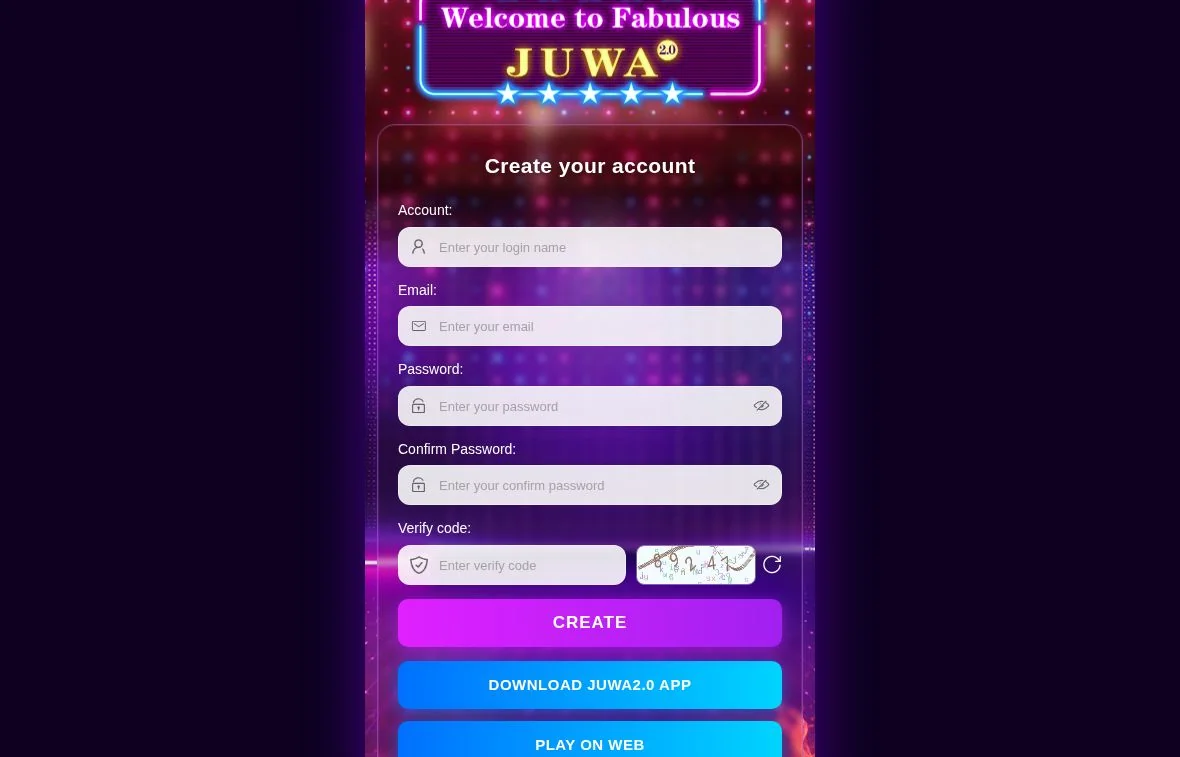
One of the biggest improvements in Juwa 2.0 is that you no longer need an agent to create your account. The self-registration flow takes about a minute. Pick a username, enter a valid email, choose a strong password, confirm the password, solve the captcha, and tap Create. You are in the app immediately after. For the complete walkthrough with screenshots and troubleshooting, follow our step-by-step Juwa 2.0 self-registration guide.

Video Guide to download Juwa 2.0

If you found this video helpful, please subscribe to the channel and leave a like! We’ll be dropping regular tutorials and tips for Juwa 2.0 right there in the channel, so stay tuned for more.


Juwa 2.0 iOS Download With No Verification: Is It Possible?

A massive amount of players search for a Juwa 2.0 download iOS no verification link, hoping to skip the “Developer Trust” step.

The truth is: It does not exist. The verification step is a mandatory iOS-level security requirement enforced by Apple, not the game developers. Any website claiming to offer a “no verification” version is distributing a fake, potentially dangerous file. Stick with the official download and complete the two-minute trust step safely.

What About “Juwa 2.0 Download iOS APK”?

This phrase comes up constantly in searches, but it is a small misunderstanding worth clearing up. APK files only run on Android. iOS uses a completely different installation format (.ipa via enterprise certificate or App Store).

So when you are looking for the Juwa 2.0 iOS download APK latest version, what you actually need is the iOS enterprise build covered in this guide. The Android APK is a separate file with its own install process and is not compatible with iPhone or iPad. If you need that version, head over to our Juwa 2.0 Android download guide instead.

Does Juwa 2.0 Work on iPad?

Yes! The app is fully compatible with both iPhone and iPad. The larger iPad display actually makes the multiplayer fish shooting games much easier to navigate and win. The installation process (Safari download → VPN & Device Management) is exactly the same as the iPhone.

Troubleshooting Common iOS Install Issues

The app icon appears but the install bar gets stuck

Tap and hold the icon, delete it, then go back to the download page and re-download. Make sure you are using Safari, not Chrome or another browser. A weak connection during the initial download is the most common cause.

I cannot find “Jiangling Motors Corporation Ltd” in Device Management

The profile only appears after the app finishes downloading. Wait until the icon on your home screen is fully visible (not greyed out), then check Settings → General → VPN & Device Management again.

The app worked yesterday but now refuses to open

Apple occasionally revokes enterprise certificates, which can cause enterprise apps to stop launching. If this happens, return to juwa2games.com, reinstall the latest build, and re-trust the developer profile. Your account and progress are stored server-side, so you will not lose anything.

I trusted the developer but the app still will not open

Restart your device. This is required after the trust step and is the fix in roughly 80% of cases we have seen.

Important Safety Tips Before You Install

Because Juwa 2.0 is distributed outside the App Store, your safety depends entirely on where you download it from. Based on what we have seen reported by the Juwa community:

  • Only use the official link from juwa2games.com or the verified juwa2slots.com platform
  • Avoid random Telegram groups, YouTube comments, and social media posts offering “free” or “modded” versions. These are the source of nearly every fake-app report we see
  • Never share your login or banking details with anyone claiming to be an agent. Juwa 2.0 is now fully player-operated, so a real agent never needs your password
  • Keep the app updated through the official source to receive security patches and new game additions

Enterprise-signed apps bypass Apple’s standard App Store review, so the trust you give the developer profile matters. Only install builds from sources you can verify.

Frequently Asked Questions

Is Juwa 2.0 safe to install on iPhone?

Yes, provided you use the official download link. The “Untrusted Developer” prompt is simply Apple’s standard warning for any app downloaded outside the official App Store.

Why does my iPhone show “Untrusted Enterprise Developer”?

Because Juwa 2.0 is distributed outside the App Store, iOS requires you to manually approve the developer (Jiangling Motors Corporation Ltd) before the app can launch. This is normal for all enterprise apps and only needs to be done once.

What if the app stops working after a few weeks?

Apple occasionally revokes enterprise certificates, which can cause enterprise apps to stop opening. If this happens, return to juwa2games.com, reinstall the latest build, and re-trust the developer profile.

Can I download Juwa 2.0 on iPad?

Yes. Juwa 2.0 is fully compatible with iPad and follows the exact same installation process as iPhone. The larger screen makes fish games and slot reels feel much more immersive.

Do I need to jailbreak my iPhone to install Juwa 2.0?

No! Juwa 2.0 installs perfectly on stock, non-jailbroken iPhones. Jailbreaking your device is never required and is strongly discouraged for security reasons.

Why can’t I find Juwa 2.0 in the App Store?

Sweepstakes and real-money style arcade apps do not meet Apple’s standard App Store guidelines in the US. Therefore, the official developer distributes the app safely via an enterprise certificate.

What is the Juwa 2.0 download link for iOS APK?

There is no such thing as an iOS APK. APKs are strictly for Android devices. To play on an iPhone, you must use the official enterprise iOS download link provided in this guide.

Final Thoughts

Even though it requires a few extra taps in your Settings app, completing the Juwa 2.0 iOS download is incredibly simple. Just remember to use Safari, trust Jiangling Motors Corporation Ltd in your Device Management settings, and restart your phone.

With over 100 games, an agent-free self-serve ATM, and massive daily rewards, Juwa 2.0 remains the top sweepstakes arcade app for Apple users in 2026.

(Ready to start playing? Download Juwa 2.0 for iOS now and follow the install steps above. You will be in the lobby within minutes. Check out our Juwa 2.0 Strategy Guide to learn how to stretch your bankroll and dominate the fish tables!)

Ready to start playing?

Leave a Reply

Your email address will not be published. Required fields are marked *