Last Updated on 18 hours ago by Elric
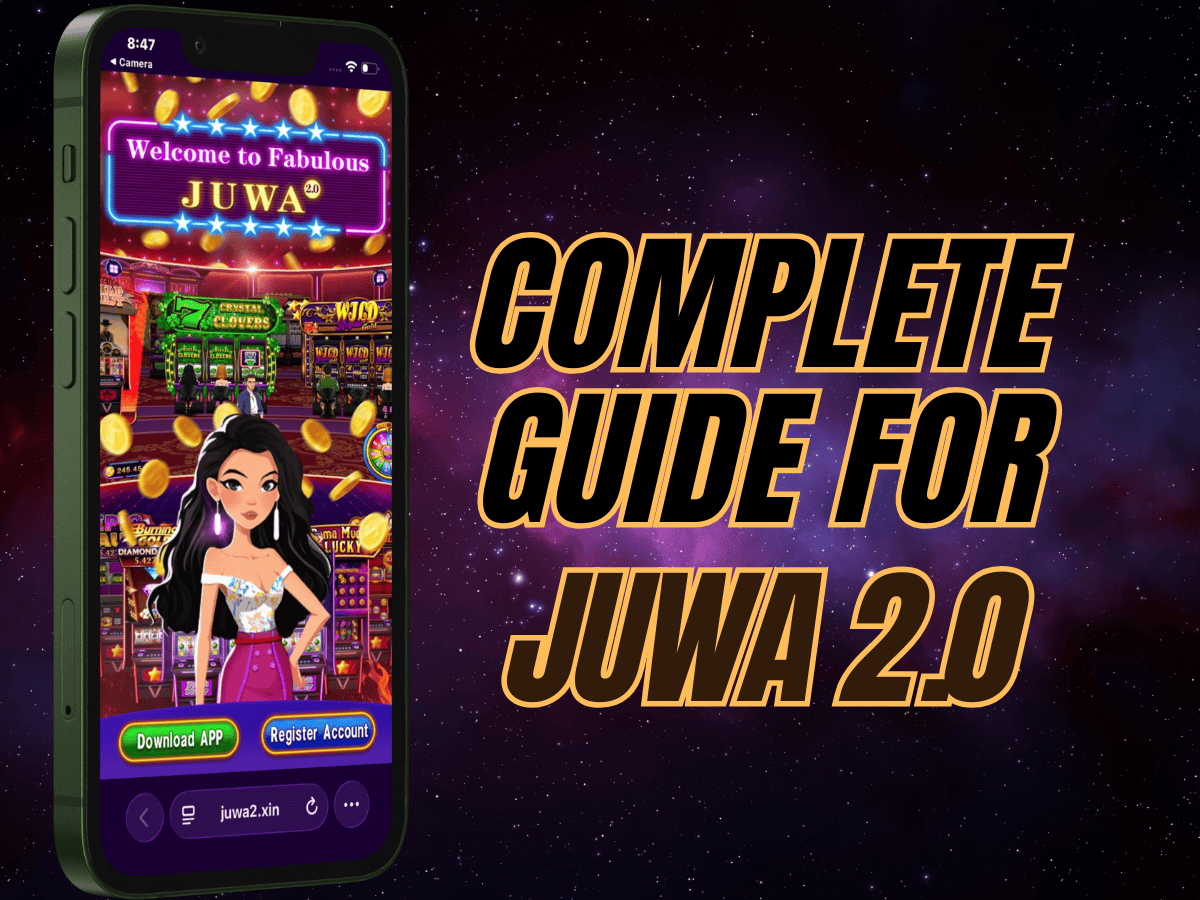
Juwa 2.0 represents a significant upgrade from previous casino-style entertainment apps, bringing smoother performance, expanded game variety, and streamlined account management to Android and iOS devices. This comprehensive guide explains how the platform works, from initial installation through in-app credit management and gameplay, with a focus on safety and informed decision-making.
Quick Start: Download + Setup (Self-Load Version)
Juwa 2.0 is a third-party casino-style entertainment app for adults. It is not available on the Google Play Store or Apple App Store, so installation uses an APK (Android) or an enterprise app trust step (iOS).
- This guide is for the self-load & self-withdraw build (in-app load/withdraw inside the ATM).
- As of mid-January 2026, Juwa 2.0 includes 70+ games (game library can vary by update/server).
- On iPhone, you may need to trust the developer profile: Jiangling Motors Corporation Ltd.
Understanding Juwa 2.0 Before You Download
Juwa 2.0 is an entertainment app offering slot-style games, fish arcade shooters, keno, and arcade-style titles designed for adult users. Unlike regulated gambling platforms, this third-party app operates outside official app stores and uses an in-app credit system for gameplay.

Juwa 2.0 has gained attention for improving the experience compared to older casino-style apps, with a larger game library, a smoother UI, and an in-app ATM area used to manage loads and withdrawals in supported builds. If you want a comparison with similar platforms, see: GameVault vs Juwa 2.0.
Key specifications
- Latest version: V 2.0.0
- File size: Approximately 200–220 MB
- Android requirement: 5.0 or above
- RAM: Minimum 2GB (3GB recommended)
- iOS: Compatible via enterprise app trust / configuration profile installation
- Developer profile shown on iOS: Jiangling Motors Corporation Ltd
The app is not available in the Google Play Store or Apple App Store due to its casino-style nature. That means users should understand APK and iOS trust/profile steps before proceeding.
How to Download Juwa 2.0 Safely on Android
Because Juwa 2.0 exists outside official stores, Android installation requires enabling a setting that normally blocks unverified apps. Follow these steps carefully.
Preparation steps:
- Verify your Android version is 5.0 or higher (Settings → About phone).
- Keep at least 250–300 MB free storage space.
- Use secure Wi-Fi for the large download file.
Download and installation:
- Open your mobile browser (Chrome recommended).
- Open the official registration/download page: Download Juwa 2.0 (Self-Register Link)
- Download the Juwa 2.0 APK file (expected size ~200–220 MB). Files much smaller can be fake or modified.
- Go to Settings → Security → Install Unknown Apps (newer Android) or Unknown Sources (Android 7 and below).
- Select your browser and enable “Allow from this source”.
- Open File Manager → Downloads and tap the APK.
- Tap Install and wait for completion.
- Open Juwa 2.0 from your home screen/app drawer.
Critical safety warnings:
- APK files from unknown sources can contain malware, spyware, or data-harvesting code.
- Only download from links you trust and can verify.
- After installation, disable “Install Unknown Apps” for your browser to reduce future risk.
- Be cautious with permissions—avoid granting unnecessary access (SMS, call logs, contacts) unless the app truly requires it.
How to Download Juwa 2.0 on iOS Devices
iOS installation differs from Android because iPhone does not allow APK files. Instead, Juwa 2.0 installs as an enterprise app and requires a manual trust step.
Installation process for iPhone/iPad:
- Tap the download link near the top of this page (or use the button): Juwa 2.0 Download / Register Link
- Once the app icon appears on your home screen, tap it.
- If you see: “Untrusted Enterprise Developer”, continue with the steps below.
- Open Settings.
- Go to General.
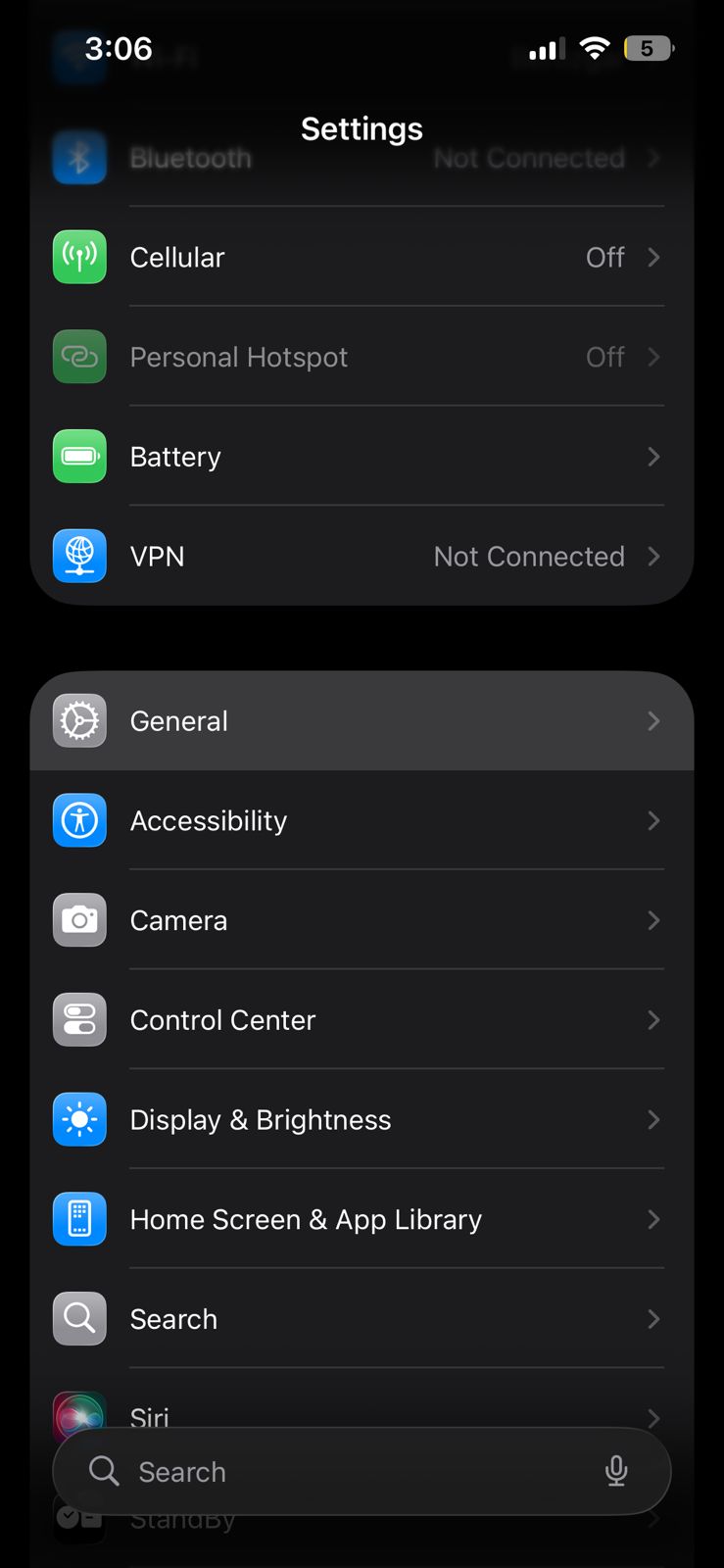
- Tap VPN & Device Management.
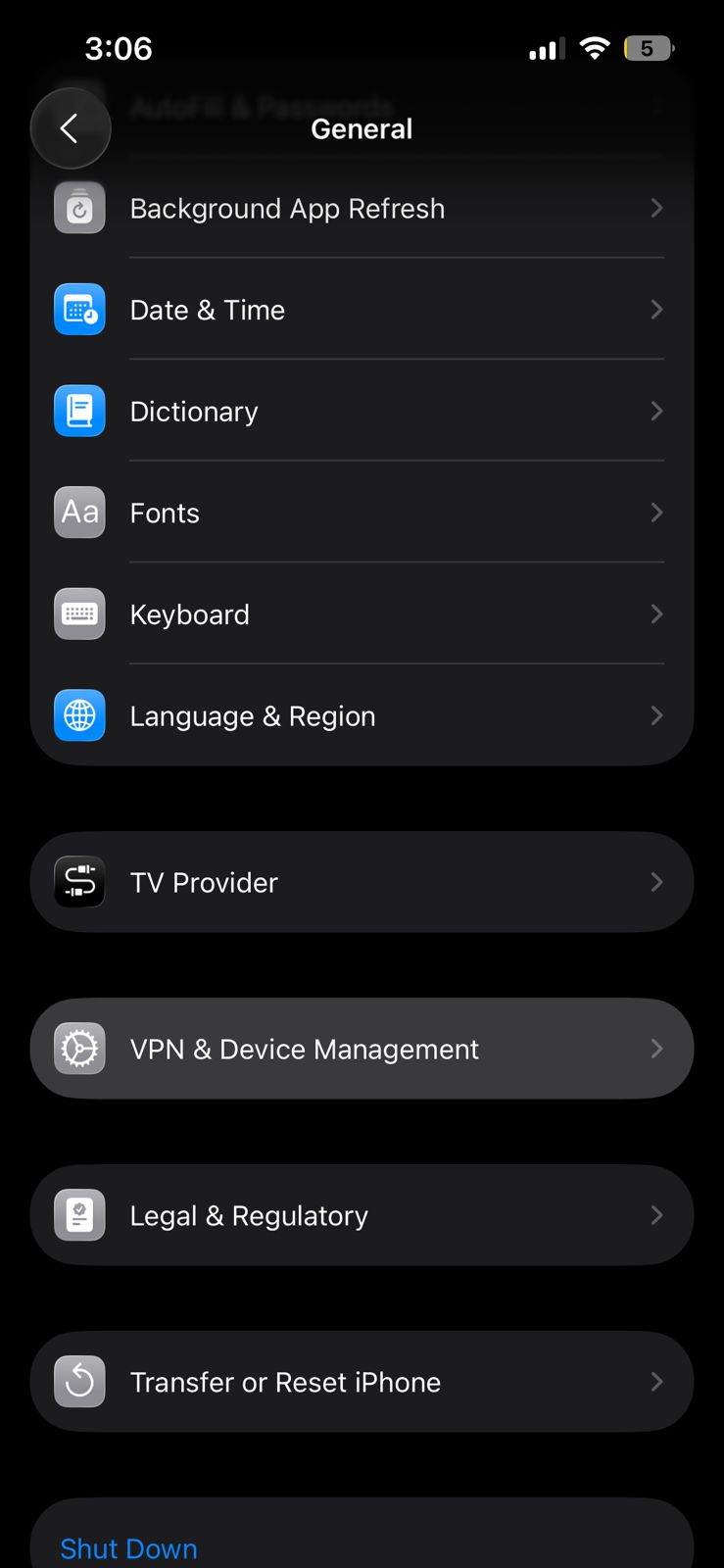
- Select the developer profile: Jiangling Motors Corporation Ltd
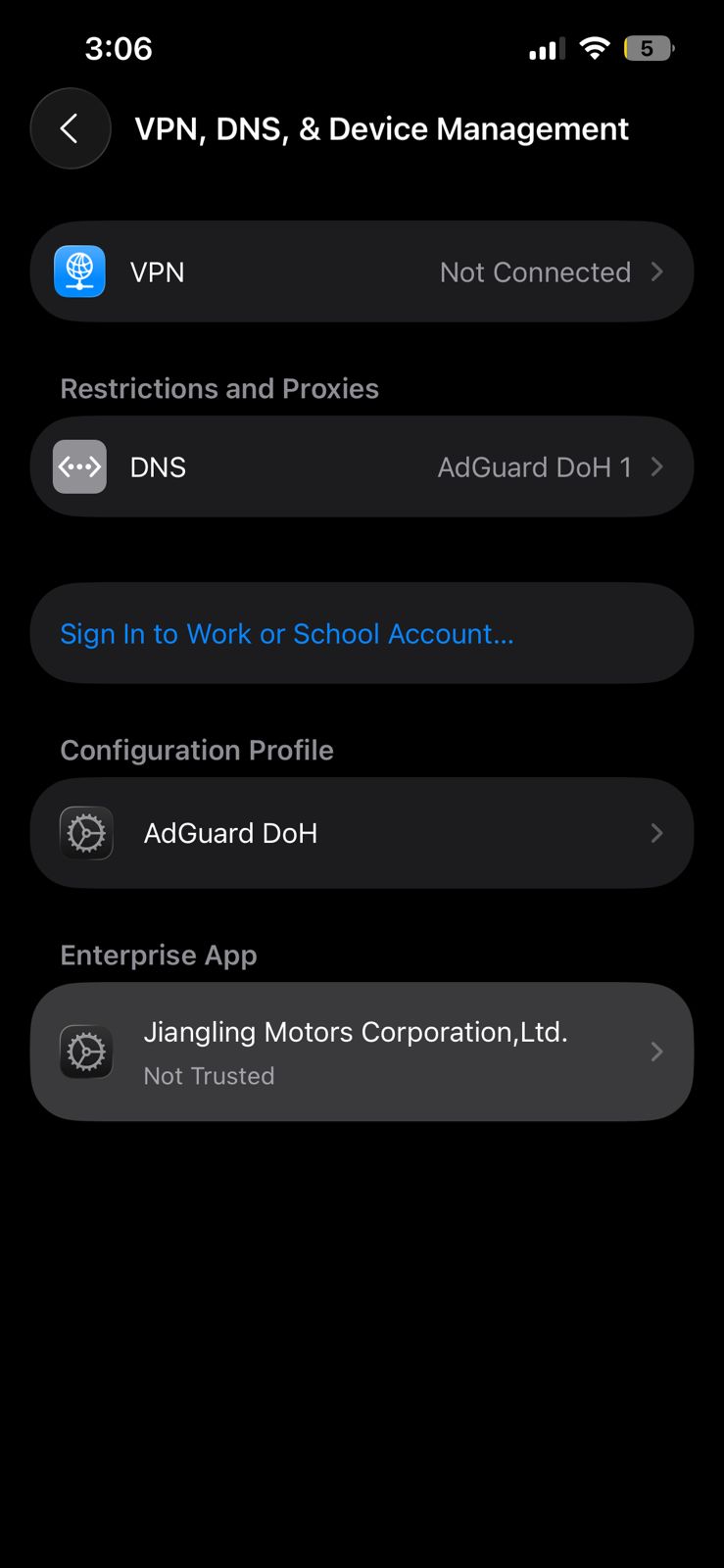
- Tap Trust “Jiangling Motors Corporation Ltd”.
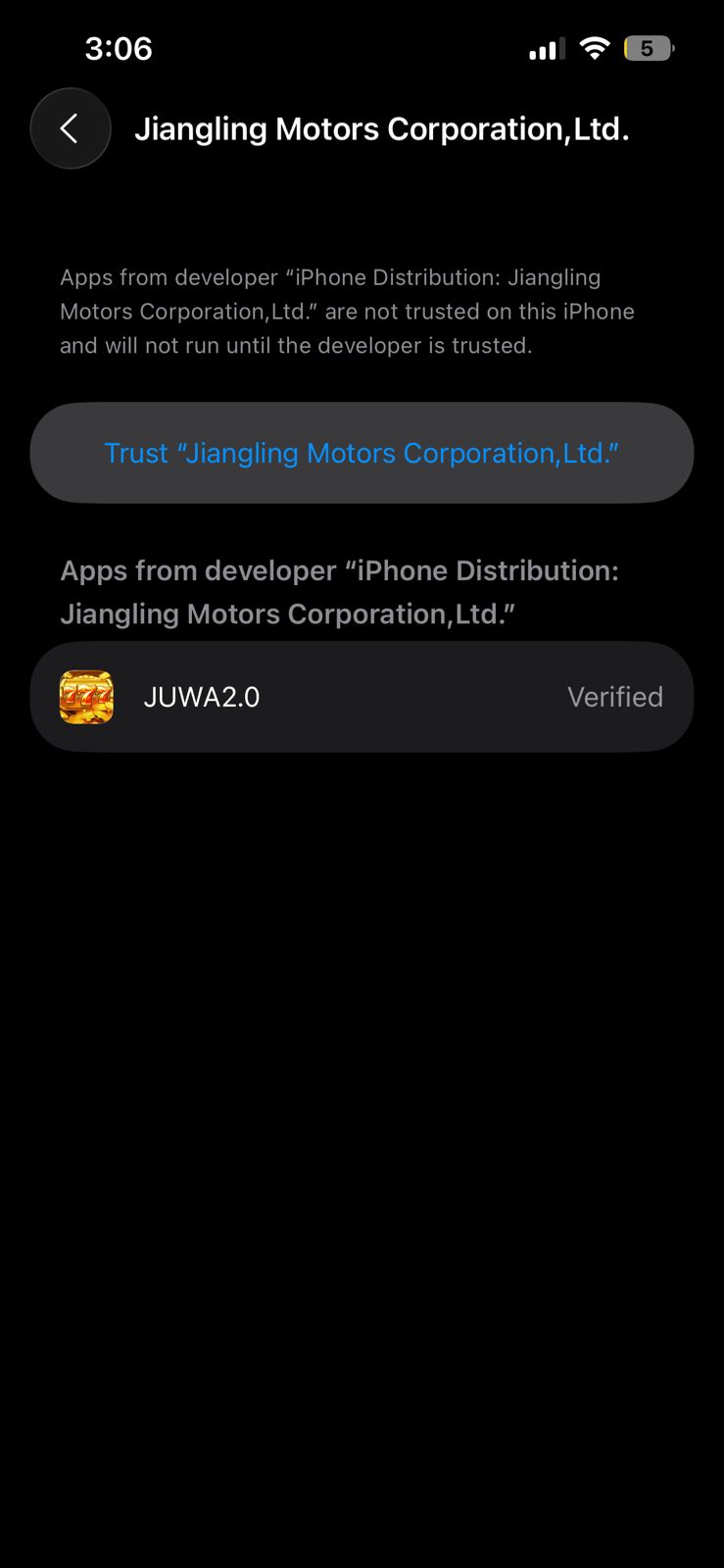
- Tap Allow when prompted.
- Restart your iPhone.
- After restart, follow any “Ready to Install → Swipe Up to Continue” prompt (if shown), then complete the installation.
- Open the app and sign in.
iOS security notes:
- Enterprise apps bypass the normal App Store review process.
- Always confirm you are trusting the correct developer profile name shown on your device before proceeding.
Self-Registration: Creating Your Juwa 2.0 Account Without Agents
One of Juwa 2.0’s most important improvements is self-registration, which removes the need for a middleman during account creation. This is the same on Android and iOS.
Step 1: Open the Registration Page
After clicking the link, you will land on the Juwa 2.0 page where you’ll see an option to self-register and download the app. Look for the “Register Account” button.

Step 2: Click “Register Account”
Tap the button. A registration form will appear.
Step 3: Enter Your Email Address
Enter a valid email address. Juwa 2.0 uses email verification to complete signup.
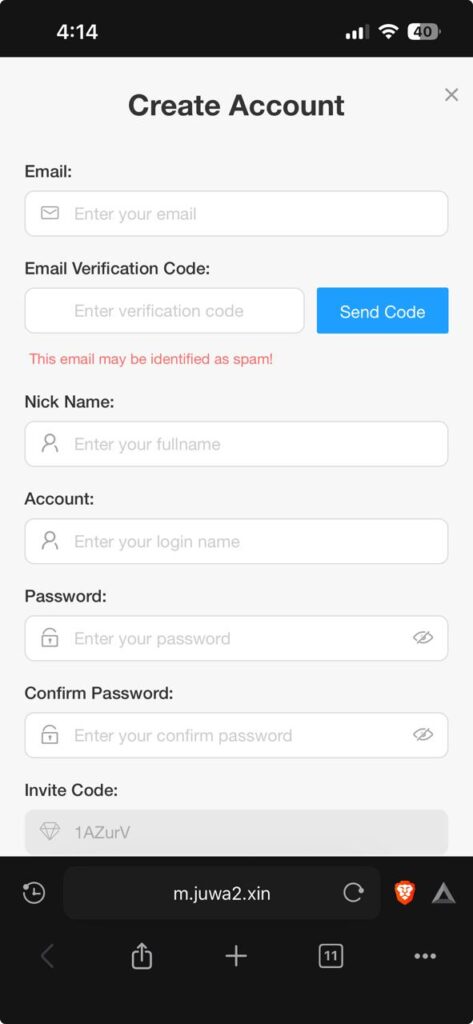
After typing your email, tap “Send Code”.
Step 4: Check Your Email for the Verification Code
Open your inbox, copy the verification code, and return to the form.
Step 5: Fill in Required Fields
Complete the form fields:
- Verification code
- Username
- Password
- Confirm password
- Any additional required information shown
Step 6: Scroll Down and Click “Create”
When finished, scroll and tap Create.
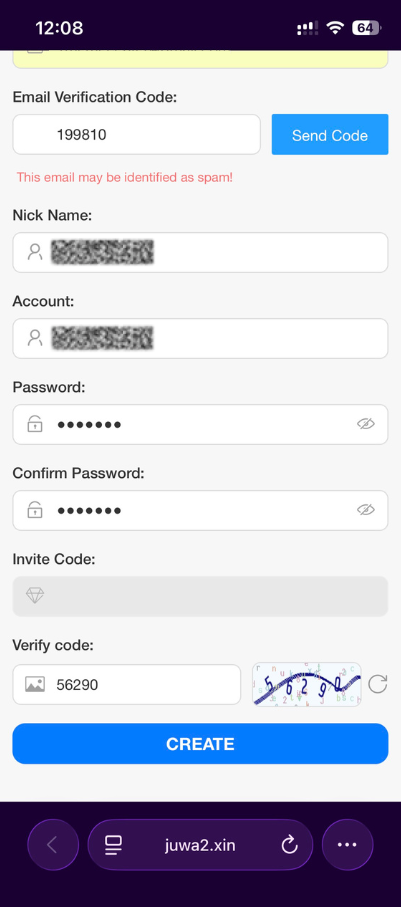
Step 7: Registration Successful – Download the App
After creating your account, you’ll see a screen where you can download the app.
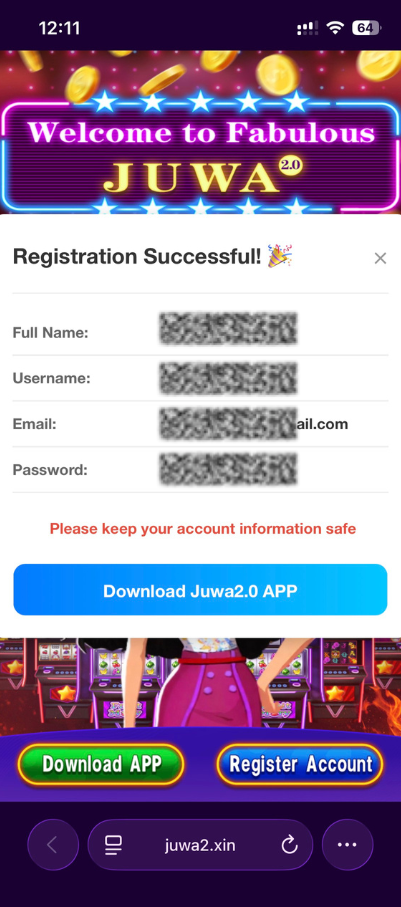
Open the game and log in with your username and password.
Account security best practices:
- Never share your login credentials with anyone claiming to be “support”.
- Enable any available security options in settings.
- Use a unique password (don’t reuse banking/email passwords).
- If you suspect compromise, change your password immediately.
Understanding the In-App Credit System and ATM Feature
This article covers the self-load Juwa 2.0 build, where users can request loads and withdrawals inside the in-app ATM (availability and payment options can vary by region/server).

How the credit system works (self-load version)
- Credits are the in-app units used for bets, entries, and gameplay.
- Loads are initiated from the ATM section (often labeled Buy/Load).
- Your available payment options inside the ATM can vary by region/server and may change over time.
- Winnings are reflected as credits in your balance.
Using the in-app ATM to load credits
- Open Juwa 2.0 and tap ATM in the lobby/menu.
- Select Buy (or Load depending on version).
- Choose a payment option shown inside the app (options vary).
- Enter the amount of credits you want.
- Follow the on-screen steps to complete the load request.
- Save any request/reference ID shown on screen.
- Wait a moment and confirm your balance updated (or check ATM history if pending).
Withdrawal process (self-withdraw version)
- Open ATM in the app.
- Select Withdraw.
- Choose the payout option shown (options vary).
- Enter the amount of credits you want to withdraw (if supported).
- Submit the request and save the reference/receipt ID.
- Track status in ATM history/queue (if available).
Important: processing times and availability can vary by region/server. Treat credits as entertainment spending and avoid loading more than you can afford to lose.
Navigating the Game Library and Understanding Game Types
As of the mid-January 2026 update, Juwa 2.0 includes 70+ games across multiple categories (exact titles can vary by update/server).

Slot-style games:
- Three-reel and five-reel slot machines with multiple themes.
- Paylines, bet levels, and bonus features vary by game.
- Common features include free spins, multipliers, and jackpot-style modes.
- Popular titles can include Fortune Tiger, Lucky Wheel, Cash Cow, and Dragon’s Treasure (availability varies).
Fish arcade games:
- Multiplayer shooters where you aim at fish for different point values.
- Ammo costs credits; rewards depend on targets and multipliers.
- Strategy depends on timing and choosing targets effectively.
Keno and lottery-style games:
- Pick numbers and wait for the draw.
- Faster rounds than traditional lottery formats.
- Payouts depend on matches and settings.
Arcade and specialty games:
- Includes wheel spins, card-style games, dice, and mini-games.
- Often lower minimum bets than some slots.
How to select games in the app:
- From the lobby, browse categories (Slots, Fish, Keno, Arcade, etc.).
- Tap a game icon to view basic details and rules.
- Tap Play / Enter.
- Choose bet levels using preset options or +/− buttons.
- Start playing using the game-specific action button.
Gameplay Tips and Responsible Usage
Juwa 2.0 is designed for entertainment. Understanding gameplay mechanics helps you make informed decisions about session length, credit limits, and game selection.
Credit management strategies
- Set a credit limit before you start playing.
- Track wins/losses using any available in-app history.
- Avoid chasing losses by loading additional credits mid-session.
- Use smaller bets to extend play time.
- Use any daily bonuses before spending loaded credits (when available).
Understanding game mechanics
- Slots are RNG-based; no timing/pattern can guarantee outcomes.
- Fish games include skill elements (aiming/timing) plus randomized multipliers.
- Higher-volatility games can have bigger swings; lower-volatility games may feel steadier.
Performance optimization
- Close background apps to improve stability.
- Use Wi-Fi for a more stable connection.
- If you experience lag, restart the app or switch games.
- Keep the app updated for bug fixes and improvements.
Responsible entertainment guidelines
- Adults only—never allow minors to access casino-style apps.
- Set time limits for balance.
- Track spending; credit systems can obscure real-money value.
- If spending/time becomes difficult to control, take a break and seek support resources.
- Treat credits as entertainment expense, not an investment.
Troubleshooting Common Issues
App won’t install on Android
- Confirm “Install Unknown Apps” is enabled for your browser.
- Check storage space (keep 250–300 MB free).
- Confirm Android 5.0+.
- Re-download the APK in case of corruption.
iOS app crashes or won’t open
- Go to Settings → General → VPN & Device Management and confirm the profile is trusted.
- Restart the device and try again.
- If needed, reinstall from the same trusted link.
Login issues or forgotten password
- Use “Forgot Password” on the login screen (if available for your account).
- If you cannot recover access, you may need to create a new account (any remaining credits in the old account may be lost).
Credits not appearing after an in-app load
- Wait 5–15 minutes—some loads can be delayed.
- Check ATM history/status for pending requests.
- If still missing after 30 minutes, use the reference ID and contact support channels shown in your build (if available).
Withdrawal request not updating
- Check ATM history/queue if your build shows status.
- Confirm you submitted the request successfully and saved the reference ID.
- Processing time and availability can vary by region/server.
Games loading slowly or freezing
- Switch to stable Wi-Fi.
- Close and restart the app.
- Clear cache (Android: Settings → Apps → Juwa 2.0 → Storage → Clear cache).
- Try a different game—some titles are heavier on older phones.
Keeping Your App Updated
Updates can add games, improve performance, and fix bugs. Because Juwa 2.0 is not distributed via app stores, you usually update by revisiting the same trusted source.
How to check for updates
- Visit the same trusted registration/download source you used originally.
- Compare the available version number with your current version (check in app settings/about).
- If a newer version is available, download the updated APK (Android) or reinstall as instructed for iOS.
- Android: installing a newer APK may work “over” the existing app (varies by build/device).
- iOS: you may need to reinstall depending on how the profile/certificate is handled.
Benefits of staying updated
- Access to newly released games and features.
- Fixes for crashes, login errors, and loading issues.
- Performance improvements.
- Compatibility with server-side changes.
Final Considerations About Third-Party Gaming Apps
This guide provides educational information about how Juwa 2.0 works, from installation through gameplay and in-app credit management. Before using any third-party entertainment app, keep these points in mind:
Legal and regulatory status
- Juwa 2.0 may operate outside regulated gambling frameworks in many regions.
- Legal status varies by location—review your local rules and laws.
- The platform may describe itself as entertainment; legal interpretations differ.
Financial considerations
- Credit loads can involve real spending—track your deposits and withdrawals carefully.
- There may be limited consumer protections compared to regulated platforms.
- Only load amounts you are comfortable potentially losing.
Platform sustainability
- Third-party apps can change availability, ownership, or distribution without notice.
- Keep balances manageable instead of storing large credit amounts.
- Do not treat credits as savings or investment.
Alternatives and comparisons
- Compare platforms before committing (GameVault, Fire Kirin, Panda Master, etc.).
- Each platform differs in game selection and user experience.
- Read community feedback to understand current reliability.
Read more helpful articles:
FAQ: Juwa 2.0 Download, Install, and Setup
Is Juwa 2.0 free to install?
Typically yes. The installer itself is usually free to download, but gameplay credit loads can involve spending depending on your region/server.
Why does my iPhone show an “Untrusted Enterprise Developer” warning?
Enterprise apps require a manual trust step. Go to Settings → General → VPN & Device Management and trust the developer profile shown on your device (commonly “Jiangling Motors Corporation Ltd”).
What’s the safest way to avoid fake APK files?
Use trusted sources, check file size (~200–220MB), and avoid APKs that request unnecessary permissions.
How do I update Juwa 2.0 without the App Store/Play Store?
Revisit the same trusted download source, compare versions, and install the updated build when available.
1 comment